- Mark as New
- Bookmark
- Subscribe
- Subscribe to RSS Feed
- Permalink
- Report Inappropriate Content

Hello everyone, I'm having trouble with accessing the internet on a second PC. I've read the suggestions posted and have tried the following, but still can't seem to surf the net.
I have a PC running XP w/ a wireless Rosewill RNX-G1/G1W b/g usb adapter.
I have the Actiontec MI424WR router from Verizon.
It is connecting to the network when I set the IP statically, but it won't grab a dynamic address.
Although I can get on the network, I still can't browse the net.
I've tried resetting the router, turning off security, manually setting DNS server route,
trying channels 11,6,1, and automatic.
Yes I am picking my network to connect to. 🙂
Any suggestions would be appreciated!
Thanks
Solved! Go to Correct Answer
Correct answers
- Mark as New
- Bookmark
- Subscribe
- Subscribe to RSS Feed
- Permalink
- Report Inappropriate Content

if you have the flickering green internet light then you need to find where you're getting stopped
So if it's wireless like you described, you really should delete the old wireless profile. and start from scratch.
This should be under Network and sharing center,
and "Manage wireless connections"

After you click on manage wireless networks, find your network and delete it. or remove it.
Don't forget to set your NIC Card back to DHCP or automatically obtain.
Try to reconnect to your network and let us know if you get an IP (make sure you are using the right WEP key and the right SSID)
If you do not then you will want to change the channel like you did earlier, and try again. one of those channels will be the magic channel number that will let you connect.
if you can't connect on any channel and get an ip using the right WEP key and ESSID (this should be on the service tag of your router, and labeled like I described) then you may need to factory reset the router and try it one last time before calling support.
- Mark as New
- Bookmark
- Subscribe
- Subscribe to RSS Feed
- Permalink
- Report Inappropriate Content
FYI If you have Dynamic IP in your PC (automatic IP not static) and you get connected sucesfully wirelessly and have a valid 192.168.1.x IP ADDRESS, then ignore the next two posts.
So far it sounds like you have TWO possible scenarios.
- You're legitimately offline and need to get back online
- You're legitimately connected but cant access.
So Situation 1 would be as follows
If you don't have an internet light on your home router, then you are probably offline. If that is the case then you'll want to try just a few things to get the internet light back. You won't connect to webpages with the internet light out, or orange. it NEEDS to be green AND flickering. if it's green and solid that isn't such a good thing from my experience.
you may or may not have tried some of these things.
- Reseat the Coax Cable (most customers are COAX wan if you are ethernet wan then reseat the ethernet cable)
- Reboot the router
- Factory Reset the Router.
If those do not get your internet light you may have one slightly more complex reboot.
The steps for that are as follows
- disconnect your routers power supply.
- Find your Batter Back up.
- Disconnect it from the AC in the wall
- Open the Battery Compartment and Disconnect the Battery Leads (follow the red/black wire away from the battery and follow it into the unit, you'll see how it connects to the unit, and it wiggles loose real easily, disconnect it)
- Leave both unplugged for about 30 sec to 1 minute
- plug in only the AC and wait for the red replace battery light to come on
- then plug in the battery that you disconnected earlier, close the door and you're done rebooting the fios ont.
- Come back and plug in your router, and wait for the internet light (its normal to go amber for about 30 sec before going green)
If you're internet light doesn't come up then you may need to call fios support 888 553 1555. if the Steps above seem intimidating to you and you don't mind waiting on the phone, then just call them, they can reboot it remotely for you.
let us know if you have the flickering green internet light.
- Mark as New
- Bookmark
- Subscribe
- Subscribe to RSS Feed
- Permalink
- Report Inappropriate Content
if you have the flickering green internet light then you need to find where you're getting stopped
So if it's wireless like you described, you really should delete the old wireless profile. and start from scratch.
This should be under Network and sharing center,
and "Manage wireless connections"
After you click on manage wireless networks, find your network and delete it. or remove it.
Don't forget to set your NIC Card back to DHCP or automatically obtain.
Try to reconnect to your network and let us know if you get an IP (make sure you are using the right WEP key and the right SSID)
If you do not then you will want to change the channel like you did earlier, and try again. one of those channels will be the magic channel number that will let you connect.
if you can't connect on any channel and get an ip using the right WEP key and ESSID (this should be on the service tag of your router, and labeled like I described) then you may need to factory reset the router and try it one last time before calling support.
- Mark as New
- Bookmark
- Subscribe
- Subscribe to RSS Feed
- Permalink
- Report Inappropriate Content
If you are connected wirelessly and it says success and you are dynamic / DHCP / Automatic (not static) then you don't need the previous two posts.
If you are connected wirelessly and it says success and you are dynamic / DHCP / Automatic (not static) then you don't need the previous two posts.
All you need to do is get connected like you were, and verify that you have a 192.168.1.x IP Address
Go to start > run / search > type CMD and hit enter
You'll get a DOS window
Type IPCONFIG hit enter. this is just a verification make sure you are 192.168.1.x IP Address
If it's 192 then type Ping (hit the space bar one time) and type 4.2.2.2
- if you get succesful replies, move on to step number 2.
- If you get Request time outs, then return to my FIRST post and do those steps to get back online
step 2 is to ping yahoo or a URL so in the DOS window type in ping www.yahoo.com (space between ping and the www's)
if it is succesful, then you have something blocking you like a proxy. you should check and if you have ANY of those boxes checkmarked or with any numbers, remove them. your box should look just like the one pictured below.
Windows - Internet Explorer
- Under "Tools" in the browser tool bar select "Internet Options".
- In the "Internet Options" window that pops up, click the "Connections" tab at the top.
- Click "LAN Settings" near the bottom of the "Connections" section.
- If the "Proxy server" checkbox is marked with a check, click it to deselect/uncheck it. See image below:
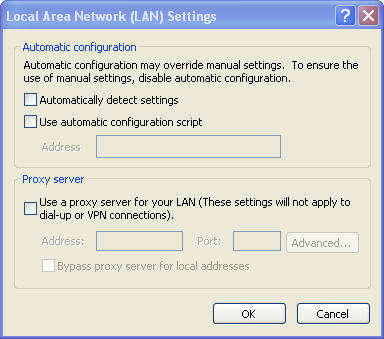
(Image shown is from Internet Explorer 6) - Click "Ok" to close the "Local Area Network (LAN) Settings" window.
- Click "Ok" to close the "Internet Options" window.
- You have completed removing the proxy settings for Internet Explorer for Windows.
- Mark as New
- Bookmark
- Subscribe
- Subscribe to RSS Feed
- Permalink
- Report Inappropriate Content
Thank you for the indepth replies! 🙂
My main PC has internet access, so I went w/post #2.
I've tried deleting the old profile and restarting before, but I got nothing , so
I tried once more and then.....bam it finds a valid IP (dynamically speaking)
#@###!@! computers!
Initially I called tech support and they tried to pass the buck and blame
my wireless access device. At that point they tried to sell me one
of their "supported" devices. Oh Verizon.
Anyways, thanks again!
- Mark as New
- Bookmark
- Subscribe
- Subscribe to RSS Feed
- Permalink
- Report Inappropriate Content
awesome, glad I could help!
- Mark as New
- Bookmark
- Subscribe
- Subscribe to RSS Feed
- Permalink
- Report Inappropriate Content

hi